Prerequisites
Steps to reproduce
Basically, ask Format-Wide for a property that doesn't exist, or more confusingly, ask it for a property that only exists on a few of the output objects.
Get-ChildItem $Home | Format-Wide Parent -Auto
Since "Parent" is only set on directory items, you'll see $Home printed out for each directory, but when it gets to the files, it crashes unceremoniously with the message: out-lineoutput : Object reference not set to an instance of an object.

Note that if the property you specify is missing on the first item, you get no output at all (except the error message).

Expected behavior
It should output an empty string when there's no property, the way it does on PowerShell 5.1
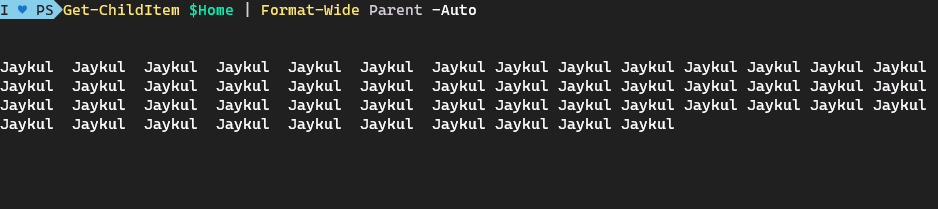
**Even** when the first few object don't have the property:

I'm not talking about the fact that in PowerShell 5.1 the "Parent" is rendered as just the name (instead of the whole path), but about the fact that for items with no value you just get an empty string.
I would accept no output without stopping (or, just skip over it)
Actual behavior
Stops outputting on the first object with a missing property and prints:

out-lineoutput : Object reference not set to an instance of an object.
Error details
Type           : System.Management.Automation.CmdletInvocationException
ErrorRecord    :
    Exception             :
        Type       : System.NullReferenceException
        TargetSite :
            Name          : GenerateRow
            DeclaringType : Microsoft.PowerShell.Commands.Internal.Format.TableWriter, System.Management.Automation, Version=7.1.4.0, Culture=neutral, PublicKeyToken=31bf3856ad364e35
            MemberType    : Method
            Module        : System.Management.Automation.dll
        StackTrace :
   at Microsoft.PowerShell.Commands.Internal.Format.TableWriter.GenerateRow(String[] values, ReadOnlySpan`1 alignment, DisplayCells dc)
   at Microsoft.PowerShell.Commands.Internal.Format.TableWriter.GenerateRow(String[] values, LineOutput lo, Boolean multiLine, ReadOnlySpan`1 alignment, DisplayCells dc, List`1 generatedRows)
   at Microsoft.PowerShell.Commands.Internal.Format.OutCommandInner.WideOutputContext.WriteStringBuffer()
   at Microsoft.PowerShell.Commands.Internal.Format.OutCommandInner.ProcessPayload(FormatEntryData fed, OutputContext c)
   at Microsoft.PowerShell.Commands.Internal.Format.OutCommandInner.ProcessObject(PSObject so)
   at Microsoft.PowerShell.Commands.Internal.Format.OutCommandInner.ProcessRecord()
   at System.Management.Automation.CommandProcessor.ProcessRecord()
        Message    : Object reference not set to an instance of an object.
        Source     : System.Management.Automation
        HResult    : -2147467261
    CategoryInfo          : NotSpecified: (:) [out-lineoutput], NullReferenceException
    FullyQualifiedErrorId : System.NullReferenceException,Microsoft.PowerShell.Commands.OutLineOutputCommand
    InvocationInfo        :
        MyCommand       : out-lineoutput
        HistoryId       : 15
        CommandOrigin   : Internal
    ScriptStackTrace      : at <ScriptBlock>, <No file>: line 1
    PipelineIterationInfo :


TargetSite     :
    Name          : Invoke
    DeclaringType : System.Management.Automation.Runspaces.PipelineBase, System.Management.Automation, Version=7.1.4.0, Culture=neutral, PublicKeyToken=31bf3856ad364e35
    MemberType    : Method
    Module        : System.Management.Automation.dll
StackTrace     :
   at System.Management.Automation.Runspaces.PipelineBase.Invoke(IEnumerable input)
   at Microsoft.PowerShell.Executor.ExecuteCommandHelper(Pipeline tempPipeline, Exception& exceptionThrown, ExecutionOptions options)
Message        : Object reference not set to an instance of an object.
InnerException :
    Type       : System.NullReferenceException
    TargetSite :
        Name          : GenerateRow
        DeclaringType : Microsoft.PowerShell.Commands.Internal.Format.TableWriter, System.Management.Automation, Version=7.1.4.0, Culture=neutral, PublicKeyToken=31bf3856ad364e35
        MemberType    : Method
        Module        : System.Management.Automation.dll
    StackTrace :
   at Microsoft.PowerShell.Commands.Internal.Format.TableWriter.GenerateRow(String[] values, ReadOnlySpan`1 alignment, DisplayCells dc)
   at Microsoft.PowerShell.Commands.Internal.Format.TableWriter.GenerateRow(String[] values, LineOutput lo, Boolean multiLine, ReadOnlySpan`1 alignment, DisplayCells dc, List`1 generatedRows)
   at Microsoft.PowerShell.Commands.Internal.Format.OutCommandInner.WideOutputContext.WriteStringBuffer()
   at Microsoft.PowerShell.Commands.Internal.Format.OutCommandInner.ProcessPayload(FormatEntryData fed, OutputContext c)
   at Microsoft.PowerShell.Commands.Internal.Format.OutCommandInner.ProcessObject(PSObject so)
   at Microsoft.PowerShell.Commands.Internal.Format.OutCommandInner.ProcessRecord()
   at System.Management.Automation.CommandProcessor.ProcessRecord()
    Message    : Object reference not set to an instance of an object.
    Source     : System.Management.Automation
    HResult    : -2147467261
Source         : System.Management.Automation
HResult        : -2146233087
Environment data
Name                           Value
----                           -----
PSVersion                      7.1.4
PSEdition                      Core
GitCommitId                    7.1.4
OS                             Microsoft Windows 10.0.22000
Platform                       Win32NT
PSCompatibleVersions           {1.0, 2.0, 3.0, 4.0…}
PSRemotingProtocolVersion      2.3
SerializationVersion           1.1.0.1
WSManStackVersion              3.0
Visuals
No response

Prerequisites
Steps to reproduce
Basically, ask
Format-Widefor a property that doesn't exist, or more confusingly, ask it for a property that only exists on a few of the output objects.Since "Parent" is only set on directory items, you'll see $Home printed out for each directory, but when it gets to the files, it crashes unceremoniously with the message: out-lineoutput : Object reference not set to an instance of an object.
Note that if the property you specify is missing on the first item, you get no output at all (except the error message).
Expected behavior
It should output an empty string when there's no property, the way it does on PowerShell 5.1**Even** when the first few object don't have the property:I'm not talking about the fact that in PowerShell 5.1 the "Parent" is rendered as just the name (instead of the whole path), but about the fact that for items with no value you just get an empty string.
I would accept no output without stopping (or, just skip over it)
Actual behavior
Error details
Environment data
Visuals
No response