An interactive SSH interception tool for authorized security audits.
Intercept sessions, monitor live traffic, inject commands, and manipulate file transfers — all in real time.








Legal notice: SSH-MITM is intended for authorized security audits, penetration testing, and research only. Do not use it against systems you do not own or have explicit written permission to test. Unauthorized interception of SSH traffic may be illegal in your jurisdiction.
Placed between a client and its SSH server, SSH-MITM intercepts the connection transparently — forwarding it to the target while giving the auditor full visibility and control:

SSH-MITM requires no installation. Download the AppImage and you are ready to go:
wget https://github.com/ssh-mitm/ssh-mitm/releases/latest/download/ssh-mitm-x86_64.AppImage
chmod +x ssh-mitm-x86_64.AppImage
For other installation options (pip, Flatpak, Snap) see the installation guide.
Point SSH-MITM at your target host — use a system you are authorized to test:
./ssh-mitm-x86_64.AppImage server --remote-host <target-host>Have the SSH client connect through SSH-MITM on port 10022:
ssh -p 10022 user@mitm-hostSSH-MITM intercepts the session and logs the credentials immediately:
INFO     Remote authentication succeeded
    Remote Address: <target-host>:22
    Username: user
    Password: secret
    Agent: no agent
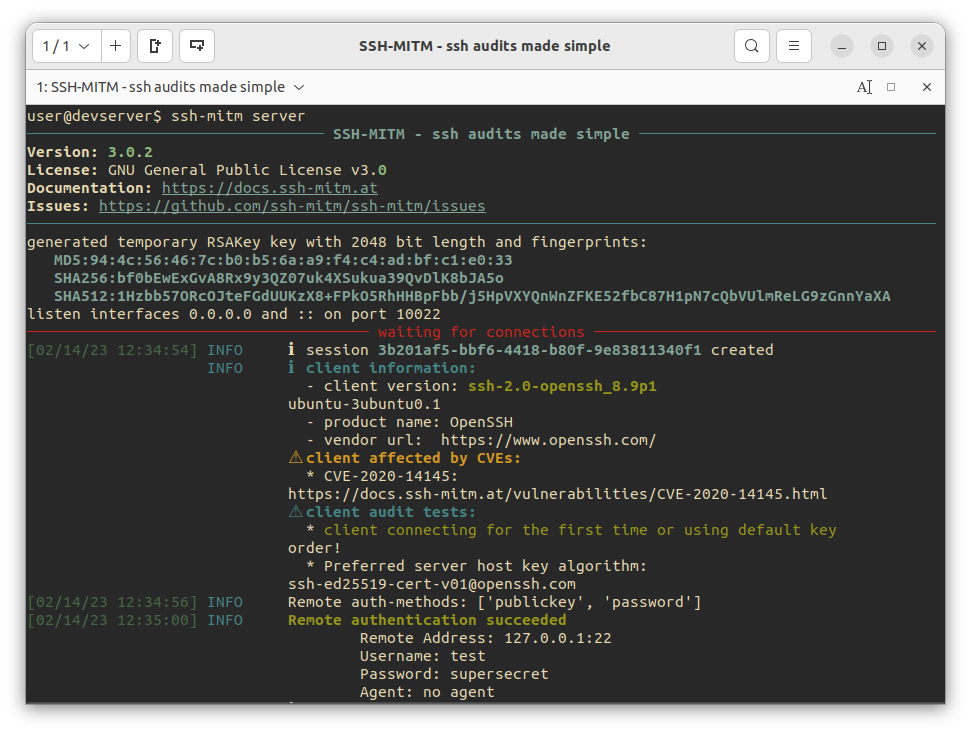
For every intercepted connection, SSH-MITM opens a mirror shell on a local port:
INFO ℹ created mirrorshell on port 34463. connect with: ssh -p 34463 127.0.0.1
Connect to it from a separate terminal:
ssh -p 34463 127.0.0.1The mirror shell reflects the session in real time. The auditor can observe the user's activity and inject commands independently, without affecting the original connection.
| Feature | Description |
|---|---|
| Interactive session monitoring | Attach to any intercepted session via a mirror shell — observe and inject commands in real time |
| File transfer manipulation | Intercept SCP/SFTP transfers, store copies, or replace files on the fly |
| Port forwarding interception | Intercept TCP tunnels and dynamic SOCKS 4/5 forwarding |
| FIDO2 token phishing | Intercept hardware token authentication via the trivial auth attack (OpenSSH info) |
| Authentication interception | Capture passwords; accept the same public key as the target server and fall back to password auth automatically |
| MOSH session monitoring | Intercept and decrypt MOSH (Mobile Shell) UDP sessions; view the live terminal via a built-in VT100/ANSI emulator |
| Client auditing | Identify known vulnerabilities in connecting SSH clients |
| Plugin support | Extend and customize all interception behavior with plugins |
- Penetration testing — actively audit SSH clients and servers in authorized engagements; intercept, manipulate, and replay sessions
- Security research — analyze SSH client behavior, authentication flows, and protocol-level weaknesses interactively
- Training environments — demonstrate MITM techniques and session hijacking in controlled lab setups
- Malware analysis — monitor and interact with SSH sessions from suspicious clients in isolated environments
SSH-MITM was originally developed to investigate a fundamental weakness in how SSH clients handle hardware token authentication. The research uncovered that FIDO2 tokens — often used as a second factor — can be phished through a technique called trivial authentication, which was subsequently assigned CVE-2021-36368.
The attack exploits the fact that SSH clients can be forced into a trivial authentication method — such as keyboard-interactive with no prompts — which effectively grants access without any real authentication. This completely bypasses hardware token protection, since the token is never challenged. SSH-MITM can simulate this against any client that does not explicitly reject it:
ssh-mitm server --enable-trivial-authThe attack only applies when public-key authentication is available — password authentication is not affected and continues to work normally.
Talk at DeepSec 2021 — full explanation of the attack:
Click to view on vimeo.com

Contributions are welcome! Please read CONTRIBUTING.md for details on the development setup, code style, and how to submit a pull request.
- E-Mail: [email protected]
- Issue Tracker