Goals adjust to your busy life
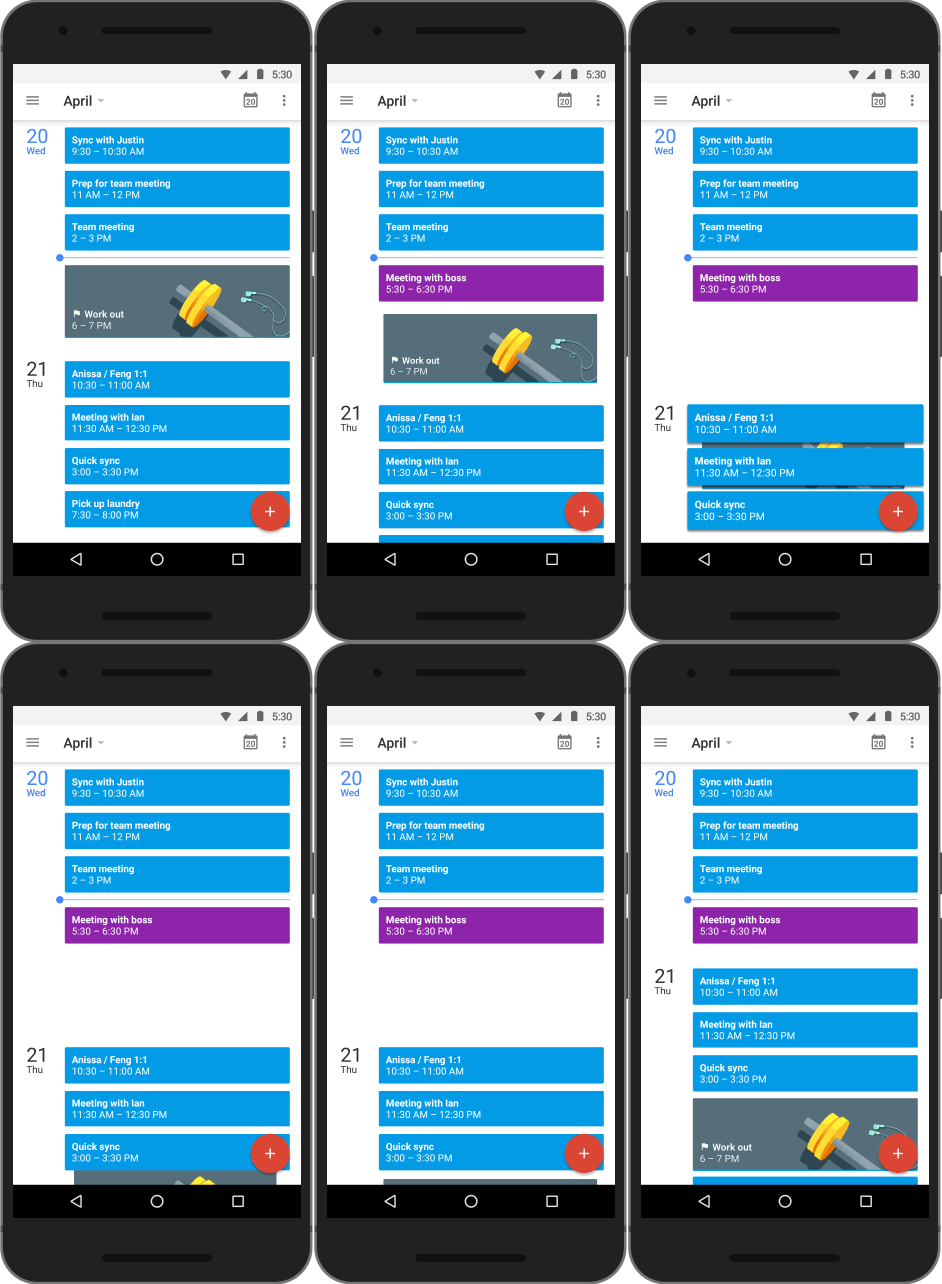
Goals aren't easy—especially when the unexpected comes up—but Calendar can help you adjust in a number of important ways. For example, Calendar will automatically reschedule if you add another event that's a direct conflict with a goal.
You can also defer a goal at any time, and Calendar will make time for it later.
Finally, Calendar actually gets better at scheduling the more you use it—just defer, edit or complete your goals like normal, and Calendar will choose even better times in the future.
Calendars should help you make the most of your time—not just be tools to track events. So as Google Calendar turns 10 today (🎉), we're excited to invest in more updates like Goals, and to help you find time for everything that matters—from your daily must-dos, to exercising more, to just a little "me time."
To get started, download the Google Calendar app for Android or iPhone, and set your first goal.
Tell the family when to expect you with trip bundles
There’s probably a lot going on in your email right now if you’ve got an upcoming trip home or holiday getaway planned. From your flight confirmation to rental car details, Inbox by Gmail already groups these emails into trip bundles so you can find everything you need for your trip quickly. Those bundles just got even more useful—you can now access them offline (good for on the plane), share the trip summary with friends or family, and add other pertinent emails (like that message with your aunt’s new address) to the bundle.
Templates in Google Docs go mobile
If you’re collecting family recipes or planning a trip, templates in Docs, Sheets and Slides help you get started faster, so you can spend more time concentrating on the words you’re writing and less time worrying about how it looks. These pre-made templates are now available on Android and iOS so you can do more while on the go. Ho, ho, ho!
Posted by Abbi Tatton, Google Editorial Elfhttps://blogger.googleusercontent.com/img/b/R29vZ2xl/AVvXsEgF3FhbuIJUZ0hOoim5xw1oT0wgfv7mwBGYybTRZDUp-lD23TJtfBUp9-Z2a-ySMPnelcqFTsk24d9ZjtnCDmamPECJkKfZzNk6lqLk-rOWv7zUji2KUnd_iqlfkKBndT3kXODa/s1600/Beutler_Google_Giftwrap_-v2TW.pngAbbi TattonEditorial ElfGoogle
Today we're ready to be that someone. Starting now, Gmail (and shortly, Calendar) will recognize addresses that contain accented or non-Latin characters. This means Gmail users can send emails to, and receive emails from, people who have these characters in their email addresses. Of course, this is just a first step and there’s still a ways to go. In the future, we want to make it possible for you to use them to create Gmail accounts.
Last month, we announced the addition of 13 new languages in Gmail. Language should never be a barrier when it comes to connecting with others and with this step forward, truly global email is now even closer to becoming a reality.
Posted by Pedro Chaparro Monferrer, Software Engineer
Gmail has always supported encryption in transit by using Transport Layer Security (TLS), and will automatically encrypt your incoming and outgoing emails if it can. The important thing is that both sides of an email exchange need to support encryption for it to work; Gmail can't do it alone.
Our data show that approximately 40 to 50 percent of emails sent between Gmail and other email providers aren’t encrypted. Many providers have turned on encryption, and others have said they’re going to, which is great news. As they do, more and more emails will be shielded from snooping.
For people looking for even stronger email security, end-to-end encryption is a good option—but it’s been hard to use. So today we’re making available the source code for End-to-End, a Chrome extension. It's currently in testing, and once it's ready for general use it will make this technology easier for those who choose to use it.
We encourage you to find tips about choosing strong passwords and adding another layer of protection to your account in our Safety Center. And check out Reset the Net, a broad coalition of organizations, companies and individuals coming together this week to promote stronger security practices on the web; we’re happy to be a participant in that effort.
Posted by Brandon Long, Tech Lead, Gmail Delivery Team
High school history students collaborate on tablets in the Google Learning Space
The school’s ultimate goal is to increase collaboration amongst students and encourage them to think more creatively instead of learning by rote memorization. And so far, the results seem to be good—the school is already experimenting with new ways to teach and learn. For example, kindergarten teachers are helping students “visit” countries around the world with Google Earth and the Cultural Institute. Electronics teacher Andre Godoy is using Google Sites and Google Glass to help his students build a formula that can move a robot with a swipe of the finger. And biology teachers have started using the Google Play app Biodigital Human to help bring anatomy to life in 3D; students can add, remove and manipulate each organ of the body using the app, gaining an understanding of various diseases and how treatments are developed. Best of all, students and teachers seem more energized and excited to participate in class.
Grade school students work with interactive biology apps from the Google Play Store
The Google Learning Space is just one example of how bringing technology into the classroom can have a real and immediate impact on both teachers and students. We’re excited to keep working on products that can help kids learn—in Brazil and around the world.
Posted by Milton Larsen Burgese, Google Head of Education, Google Brazil
Chromebox for meetings is available in the U.S. today starting at $999, which includes the ASUS Chromebox and everything you need to get going. That means for the same price that companies have typically paid for one meeting room, they'll be able to outfit 10 rooms—or more. CDW and SYNNEX will help bring Chromebox for meetings to customers and resellers, and Chromeboxes from HP and Dell will be available for meetings in the coming months. Later this year, we plan to launch in Australia, Canada, France, Japan, New Zealand, Spain and the U.K.
Companies like Eventbrite, Gilt, oDesk and Woolworths have been testing Chromebox for meetings, and have told us that they love the simple setup, the ease of use, and being able to see their colleagues in other offices. More importantly, the low price will enable them to extend these benefits to even more employees, rooms and offices. Find out how Chromebox for meetings can help you and your coworkers see eye-to-eye. Happy meetings, everyone!
Bigger, faster spreadsheets
The new Sheets supports millions of cells and kicks many of the old size and complexity limits to the curb. Scrolling, loading and calculation are all snappier, even in more complex spreadsheets.
New features based on your feedback and requests Filter views is a new feature unique to Google Sheets that lets you quickly name, save and share different views of your data. This comes in handy when you’re collaborating so you can sort a spreadsheet without affecting how others see it.
Whether you’re new to formulas or a whiz at running complex functions, it’s now easier to set up and perform calculations. New function help and examples guide you as you type, and error highlighting and coloring make it easy to spot and fix mistakes.
As another time-saving improvement, text now automatically flows into empty adjacent cells—no manual merge needed.
With the improved conditional formatting, you can add rules to change the colors and styles of cells in your spreadsheet based on custom formulas.
No Internet connection? Work offline with Chrome
You shouldn’t have to think about whether you have a WiFi connection when you want to work. So just like Google Docs and Slides, you can now make edits to Sheets offline. When you reconnect to the Internet, your edits will automatically sync. If you've edited Docs or Slides offline in the past, then you’re already set up to edit Sheets offline. If not, follow these one-time instructions for setting up offline in Chrome.
Ready to try it out?
Turn on the new Sheets by checking the “Try the new Google Sheets” box in Google Drive settings. From then on, all new spreadsheets you create will work offline and include these new features. We’ll be adding a small list of missing features in the coming months, so if you rely on any of them, you may want to wait a little longer before opting in.
When you click on one of those previews, a full-screen view of the image or document will appear. You can read, search for a particular phrase, and even browse through multiple attachments right in Gmail.
You can now also save your attachments directly to Drive simply by clicking the Drive button that appears when you hover over the preview. Of course, if you prefer to download the attachment to your computer, you can—just click the arrow button.
This new attachment experience is available on desktop and will be rolling out over the next week. If you’re one of the more than 120 million active Drive users, you know that saving your files to Drive lets you get to them from any computer, phone or tablet. And if you aren’t taking advantage of Drive just yet, give it a try with your next Gmail attachment.
Posted by Scott Johnston, Director of Product Management
Google Keep is available on Google Play for devices running Android 4.0, Ice Cream Sandwich and above. You can access, edit and create new notes on the web at http://drive.google.com/keep and in the coming weeks you'll be able to do the same directly from Google Drive.
To try it out, check the box next to Enable input tools under Language in Settings.
Once you’ve enabled it, you’ll see the Input Tools icon next to the Settings button in your toolbar, and you can turn on and off any Input Tool from there.
With these new virtual keyboards, Gmail supports typing in 75 languages—a big jump from the five languages that were initially supported when we introduced Indic transliteration in Gmail in 2009.
Gmail’s users are from all over the world—and language should never get in the way of a good conversation. If you'd like to use Input Tools in other places, try out the Chrome extension, the Windows desktop client or the Android app.
Updates for iOS
Starting today, if you’re using the Drive app on your iOS device you can also edit Google documents, just as you can with the Android app. From your iPhone or iPad, you can create a new document, edit an existing one or format text. And, just like on your computer, you’ll be able to see other people’s edits instantly as they’re made.
You’ll also notice other new improvements to the iOS Drive app. For example, you can now view Google presentations on your iPhone or iPad, including speaker notes, full-screen mode and the ability to swipe between slides. You can also create new folders, move files into folders and upload stuff (like photos and videos) from your device directly in the Drive app.
Updates for Android
We’re also updating the Drive app for Android phones and tablets today. You can now add comments, reply to existing comments and view tables in your Google documents. And you’ll have the same new abilities to view presentations and organize your stuff as your friends with iPhones do.
More to come...
Looking ahead, we have plenty more planned for the Drive mobile apps—including native editing and real-time collaboration for Google spreadsheets. Stay tuned.
Get Drive in the App Store for your iPhone, iPad or iPod touch and visit the Play Store to get the latest on your Android phone or tablet. To learn more about Google Drive, visit drive.google.com/start.





.png)


 Follow
